Desktop Soundbar Buying Guide: What to Check First
Choosing a desktop soundbar? Check power, size, bass and placement before you buy. A short, practical guide.
 By Ahamed Khan
In this guide13
- 01What a desktop soundbar actually does
- 02Who this kind of speaker suits
- 03Understand the power source
- 04Size and placement on your desk
- 05Sound quality: what to expect and what to ignore
- 06What RGB lighting adds
- 07Build, weight and care
- 08Set up and sound settings
- 09Mistakes to avoid
- 10Delivery and what to check before ordering
- 11The bottom line
- 12Submit Your Story
- 13How This Article Was Created
Most laptop and monitor speakers are an afterthought. They are thin, quiet and a little tinny, and you only notice how much they lack when you play a good song or watch a film. A desktop soundbar is one of the cheapest ways to fix that, and it takes about a minute to set up.
This guide explains what a desktop soundbar does, what to check before you buy, and which mistakes waste money. We use a 2.0 channel, USB powered bar with RGB lighting as the running example, because that is a common and sensible choice for a small desk. The advice applies to most bars in this class.

What a desktop soundbar actually does
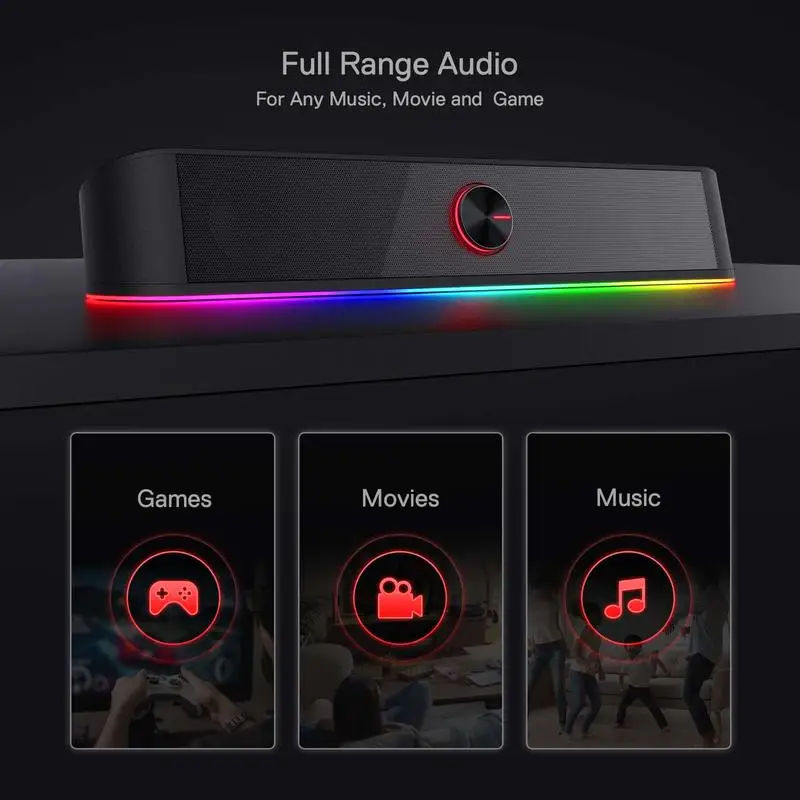
A soundbar packs a left and a right speaker into one slim body. That is what the “2.0 channel” label means: two channels, left and right, with no separate subwoofer. It gives you stereo separation without two boxes and a tangle of wires on your desk.
Compared with built-in laptop speakers, a bar has a bigger cabinet and larger drivers, so it usually sounds fuller and goes louder before distorting. It will not turn your desk into a cinema. It will make voices clearer and music less thin, and that is the upgrade most people want.
Think about the sounds you hear most. If your day is video calls, podcasts and lectures, clear voices matter more than anything else. If you mostly play games or watch films, stereo separation helps you place footsteps and effects. A 2.0 bar helps with both, within the limits of its size.
Who this kind of speaker suits
A compact USB bar suits anyone who works, studies or plays at a desk and wants better sound without a big setup. It fits remote workers on video calls, students who watch lectures, casual gamers and people who stream music all day.
It is less suited to a large room, a party or a home theatre. If you want deep bass that you can feel in the floor, a bar of this size will disappoint you. Be honest about where it will live and how loud you really play things.
It also suits shared spaces where you want something tidy. One bar is easier to hide than two separate speakers, and a single cable is easier to route behind a monitor than a pair.
Understand the power source
The bar we are describing runs from a USB port. That is handy, because there is no separate power brick and one cable can often cover power. It also means the bar works on anything with a spare USB port, including a laptop.
Check two things before you buy. First, make sure your computer has a free USB port, or that you own a hub with room to spare. Second, remember that USB power limits how loud a speaker can get. A USB bar is built for desk distances, not for filling a big space.
If your laptop has only one or two ports, think about what else needs them. A mouse receiver, a drive and a charger can use up the supply quickly. A small powered hub solves that, and it is a cheap fix.
Size and placement on your desk
Measure the gap in front of your monitor before you order. A slim bar is meant to sit directly in front of the screen or just below it, but you need clear desk space of roughly the bar’s length, plus room for your keyboard.
Check the product page for the dimensions, then lay a tape measure or a strip of paper on your desk. If the bar blocks the bottom edge of your screen or crowds your keyboard, you will end up moving it every day, and that gets old fast.
Sound is best when the bar points at your ears and sits roughly level with them. If it sits much lower, angle it up slightly with a small stand or a folded cloth under the back edge. Keep the front grille clear, because anything placed against it muffles the sound.
Sound quality: what to expect and what to ignore
Spec sheets love big numbers. Be careful with them. Peak power claims tell you little about how a speaker sounds. What matters more is whether the bar stays clear at the volume you actually use.
At desk distance, you rarely need high volume. A bar that sounds clean at a moderate level is better than one that shouts and distorts. When you first set it up, play music you know well, vocals and acoustic tracks especially, and listen for harshness or a boxy sound.
Do not expect strong bass from a slim plastic body. Many people add a little bass boost in their computer’s sound settings, which helps without much cost to clarity. Try small changes and listen again, because heavy boosts usually make everything muddy.
What RGB lighting adds
RGB lighting is a cosmetic extra. It will not change how the bar sounds, but it does add colour to a desk, which suits a gaming corner or a dark room. If you prefer a plain setup, check the product page for how the lighting works and whether you can switch it off.
One practical tip: lights on a bar that sits right in front of your screen can distract you in a dim room. Try the lighting at night before you decide it is a feature rather than a nuisance. Matching the colours to a keyboard or mouse glow also makes a desk look put together.
Build, weight and care
This bar has a plastic body and weighs about 0.9 kg. That is light enough to move around easily and heavy enough to stay put on a desk. Plastic keeps the cost down, but it also means you should treat it gently. Do not stack things on top, and keep drinks away from it.
To clean it, switch it off, unplug it and wipe the body with a dry or barely damp soft cloth. Skip sprays, which can seep into the grille. A soft brush clears dust from the front and the vents. Do this every few weeks, since desks collect more dust than people expect.
Route the cable so it does not hang under tension. A cable pulled tight from the port is the first thing to fail on any desk gadget. A small clip or a cable tie fixes this in seconds.
Set up and sound settings
Plug the USB cable into your computer, and your system should offer the bar as an output. Pick it in your sound settings, then adjust volume on the computer first and on the bar second. Leaving the bar at a middle level and controlling volume from the computer often gives a cleaner result.
If you also use headphones, you will switch outputs now and then. Check which device is selected if you suddenly hear nothing. It is the most common reason people think a new speaker is faulty.
It also helps to test with a few different sources: a song, a spoken podcast and a film clip. Each one shows a different weakness, and you will quickly learn whether the bar suits the way you use your computer.
Mistakes to avoid
The first mistake is buying on a power number alone. The second is ignoring desk space until the box arrives. The third is expecting cinema bass from a compact body. The fourth is plugging into a weak or overloaded USB hub, which can cause hum or dropouts. Plug directly into your computer when you can.
Finally, do not skip the basics of fair buying. Read the listing carefully, look at what is included, and check the delivery details before you pay so there are no surprises.
Delivery and what to check before ordering
This particular bar ships from a US warehouse to US addresses only, with tracking. Live delivery options and the exact cost appear at checkout before you pay. If you are in the United States, browse our US store for items that ship the same way, and see the Desk Tech collection for other desk upgrades.
If you also want sound that moves with you, our guide to portable Bluetooth speakers covers what to look for in a battery-powered option.
The bottom line
A desktop soundbar is a small, low-effort upgrade with a big everyday payoff. Decide where it will sit, check that you have a USB port, set sensible expectations on bass, and enjoy clearer sound. If that matches how you work, the RGB USB desktop soundbar is a simple place to start.

RGB USB Desktop Soundbar, 2.0 Channel Computer Speaker
A desktop soundbar with RGB lighting and USB power that gives your PC or laptop fuller sound than built-in speakers.
$38.99
View productSubmit Your Story
Which desk gadget improved your daily routine the most? Share it through our contact page and we may feature it in a future article.
How This Article Was Created
This article was written from the product details on our listing and widely known buying considerations. It contains no unsourced statistics and only mentions features shown on the product page. Please check the page for current options and prices. Because this item ships from a US warehouse to US addresses only, it is not available for delivery elsewhere.